Home › BUSY Guides › Long Purchase Bills in BUSY? Stop Typing Them: Import from the E-invoice
Long Purchase Bills in BUSY? Stop Typing Them: Import from the E-invoice
लंबे खरीद बिल BUSY में: अब टाइप नहीं, e-Invoice से सीधे आइटम-वार एंट्री
A 60-line supplier bill takes ages to type in BUSY and one wrong HSN or rate costs ITC. Here is how to post it item-wise from the e-invoice instead.
Every accountant knows the bill: a distributor or manufacturer sends a purchase invoice with 40, 60 or 100 lines. In BUSY each line needs the item, HSN, quantity, unit, rate and GST. It takes a long time, and one slip (a wrong rate, a missed line, a 12 typed as 21) means the bill no longer matches what the supplier reported, so your ITC is questioned.
Most of these long bills come from bigger suppliers, and bigger suppliers issue e-invoices. Every e-invoice they register is available to you, the buyer, on the GST e-invoice portal with every line in it. That data can go into BUSY directly instead of being typed again.
Why long bills are a problem
- Time: a long bill can hold up the purchase register for the whole day, and month-end has many of them
- Typing errors: wrong HSN, rate or quantity on one line changes the tax, and the bill no longer matches GSTR-2B
- Missed bills: while long bills wait, some never get entered, and their ITC is lost or claimed late
- Stock goes wrong: rate-wise entries (one line per GST rate) save time but leave no item-wise stock or HSN detail
- Duplicate items: the supplier's item name is typed a little differently each time and new look-alike items pile up
What the e-invoice already contains
A registered e-invoice (it has an IRN) holds the full bill in a fixed format. GSTR-2A / 2B only give you rate-wise totals of each bill.
| Detail | GSTR-2A / 2B | E-invoice |
|---|---|---|
| Supplier GSTIN, bill no, date, value | Yes | Yes |
| Taxable value and tax, rate-wise | Yes | Yes |
| Item name, line by line | No | Yes |
| HSN code of each line | No | Yes |
| Quantity and unit | No | Yes |
| IRN | Not always | Yes |
On the GST e-invoice portal a registered business can download the e-invoices it received as JSON files, period by period (Download e-Invoice JSONs > Received). Doing that by hand every month and then typing from the file is still work. That is what the next step removes.
The new way: e-invoice import into BUSY
Bharat GST Champ (+ E-Invoice Import edition) is a BUSY add-on that fetches those received e-invoices and posts them in BUSY item-wise. To our knowledge, it is the first BUSY add-on to post received e-invoices item-wise.
Fetch the e-invoices
In BUSY open Add-Ons > Bharat GST Champ and press E-invoice Fetch. Your own Chrome or Edge opens the e-invoice portal with your user id filled in; you type the CAPTCHA, tick the months, and the received e-invoice JSON comes into the tool. It only downloads; nothing is filed or changed on the portal.
Load e-invoice + GSTR-2B
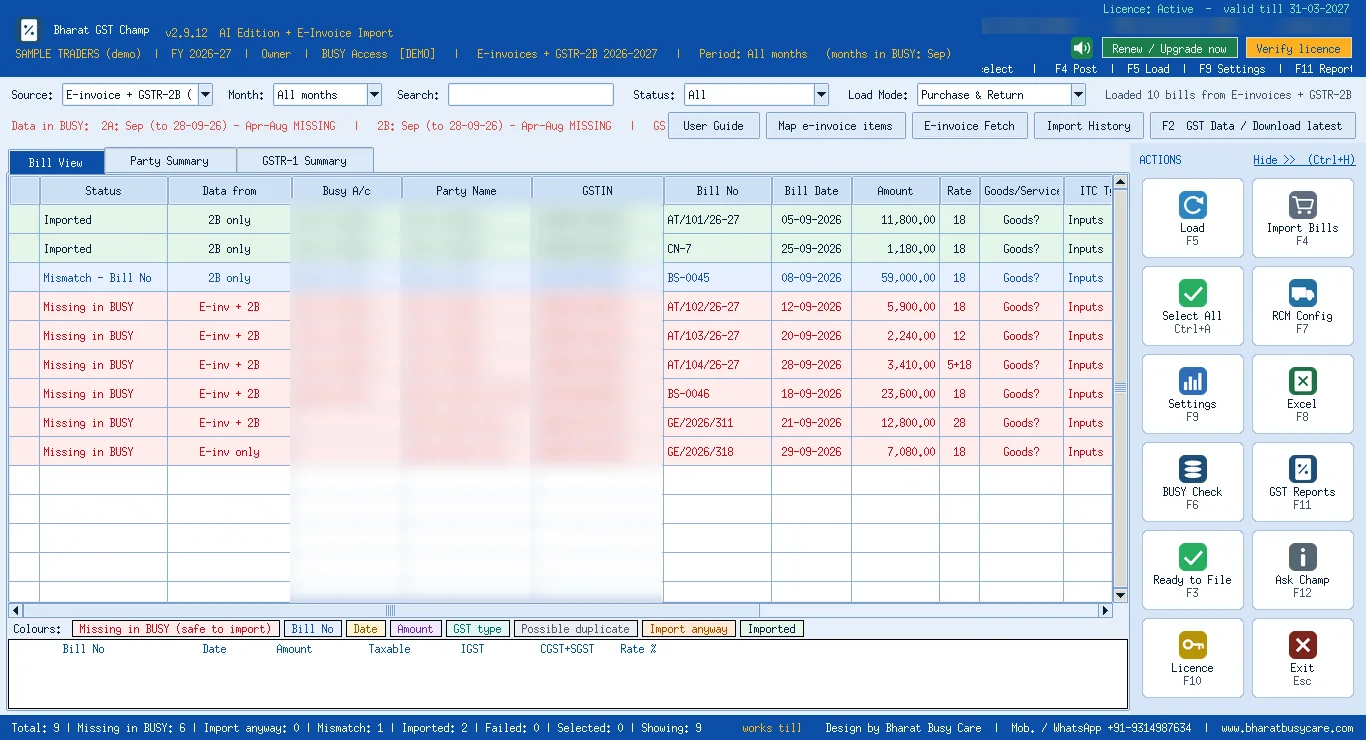
Choose Source E-invoice + GSTR-2B (combined) and press F5. E-invoices come first with full item detail; GSTR-2B bills that have no e-invoice are added after them, so nothing is missed. The Data from column shows E-inv, 2B or both for every bill, and bills not yet in BUSY are shown in red.
Check the lines
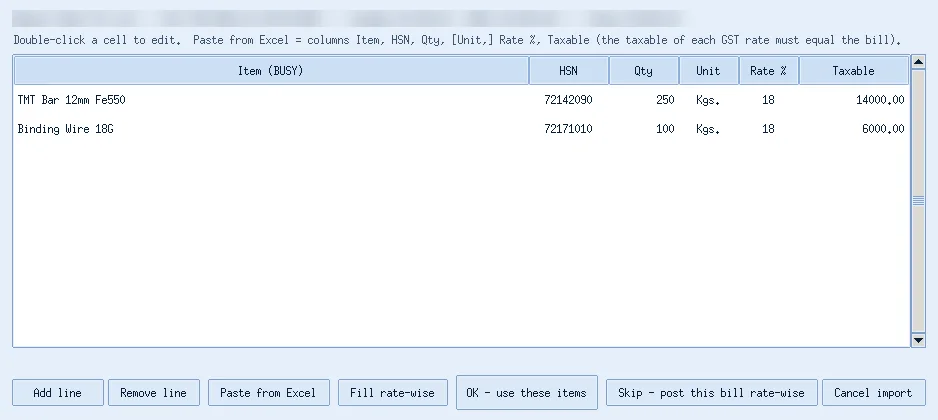
Open any bill to see its lines as they will be posted: item, HSN, quantity, unit, GST rate and taxable value, taken from the e-invoice.
Map items once
Map e-invoice items lists every item name found in the e-invoices with its HSN and suggests the matching BUSY item. Save the map once; the same supplier names then post to your existing items every month, with no look-alike masters.
Pre-check and post
Ctrl+A selects only the bills that are safe to import, F4 runs a pre-check of series, voucher type and accounts, and after your Yes each bill is saved in BUSY as a purchase voucher, item-wise, with the IRN in the narration.
Keep the record
Every run is saved in Import History with an Excel report, and a wrong run can be reversed.
Manual entry vs e-invoice import
| Typing the bill in BUSY | E-invoice import | |
|---|---|---|
| Source of the lines | Paper or PDF bill, typed by hand | The supplier's registered e-invoice |
| Item, HSN, quantity, rate | Typed line by line | Taken from the e-invoice |
| Chance of typing errors | Grows with every line | No typing; you review and confirm |
| Matching with GSTR-2B | Checked separately | Shown on the same screen (Data from) |
| Duplicate bill check | Depends on the user | Same supplier + bill no. checked in BUSY before every save |
| Long bill, many suppliers | Hours at month-end | Fetched, checked and posted together |
What you need
- BUSY 21 with the company open (the add-on runs from BUSY's Add-Ons menu)
- Login for the GST e-invoice portal for your GSTIN
- Suppliers who issue e-invoices. E-invoicing applies to suppliers above the turnover limit (currently Rs 5 crore), so most long bills from big suppliers qualify; smaller suppliers' bills still come from GSTR-2B
- A BUSY backup before the first posting
Good habits
- Fetch e-invoices every month, soon after month-end, while the portal still offers the files
- Map items before the first big import, so stock goes to the right items
- Read the pre-check before saying Yes, and keep the Import History report with your month's papers
- If the physical bill and the e-invoice differ, believe the e-invoice for GST and ask the supplier about the paper bill
Try it on your own data: Bharat GST Champ has a free demo (sign in with Google + OTP). Watch the 70-second video.
Need it done for you?
Our team sets this up remotely over UltraViewer, usually the same day. Call or message us, or see BUSY services.
Disclaimer: This article is general information for business owners, accountants and tax professionals, written by Bharat Busy Care as understood on the date shown below. It is not legal, tax or professional advice. GST, income-tax and other laws, rates, forms, due dates and portal steps change often: check the current Acts, rules, notifications, circulars and official advisories, and consult your CA or tax practitioner before acting on it. BUSY menu names can differ by version, plan and configuration; take a backup before changing settings. Bharat Busy Care is not responsible for any loss arising from the use of this information. BUSY is a trademark of its owner; Bharat Busy Care is an Authorised BUSY Platinum Partner. See our terms.
अस्वीकरण: यह लेख केवल सामान्य जानकारी के लिए है, कानूनी या टैक्स सलाह नहीं है। नियम बदलते रहते हैं; कोई भी निर्णय लेने से पहले नवीनतम अधिसूचना देखें और अपने CA / टैक्स सलाहकार से सलाह लें।
Updated 2026-10-29 · Bharat Busy Care, Authorised BUSY Platinum Partner
FAQ
How do I enter a purchase bill with many items in BUSY quickly?
If the supplier issued an e-invoice, import it instead of typing it: Bharat GST Champ fetches your received e-invoices from the e-invoice portal and posts each bill in BUSY item-wise with HSN, quantity, unit and rate after a pre-check and your Yes.
Can I import an e-invoice JSON into BUSY?
BUSY itself creates e-invoices for your sales. For bills you receive, the Bharat GST Champ add-on reads the received e-invoice JSON from the portal and posts purchase vouchers in BUSY.
Which purchase bills can be imported this way?
Bills your suppliers issued as e-invoices, which applies to suppliers above the e-invoice turnover limit (currently Rs 5 crore). Other bills come from GSTR-2B and are posted with remembered items or rate-wise.
Will the supplier's item names create new items in BUSY?
Not if you map them: Map e-invoice items links each e-invoice item name to an existing BUSY item once, and the map is kept for the company.
Is anything posted without my approval?
No. Bills are posted only after the pre-check and your Yes, each import is listed in Import History, and a wrong run can be reversed. Take a BUSY backup before the first posting.
Talk to a BUSY expert
Call or message us; we answer in Hindi or English.