Home › BUSY Guides › Now a Smart Accountant Can Take a Holiday With Family: a Month of Purchase Bills in BUSY in About 5 Minutes
Now a Smart Accountant Can Take a Holiday With Family: a Month of Purchase Bills in BUSY in About 5 Minutes
अब स्मार्ट अकाउंटेंट भी परिवार के साथ छुट्टी मना सकता है: 30 दिन के परचेज़ बिल 5 मिनट में
An accountant's daily sales and purchase work in BUSY, why month-end eats family time, and how Bharat GST Champ posts a month of e-invoiced purchase bills in minutes.
Ask any accountant when they last took a holiday in the first week of the month. Most will laugh. Sales bills go out every day, purchase bills pile up on the desk, and before GSTR-1 and GSTR-3B everything must be entered, matched and filed. Family plans wait for "after the return".
It does not have to be that way any more. Sales are already made in BUSY as you bill. The slow part is typing purchase bills, and that part can now be done by the computer: Bharat GST Champ brings your suppliers' bills from the GST portal and posts them in BUSY, item-wise, after your check. A month of purchase bills, done in one sitting.
An accountant's day in BUSY
| Work | When | How it is done today |
|---|---|---|
| Sales bills (invoice, e-invoice, e-way bill) | Every day, as goods go out | Made in BUSY at the counter or office; BUSY creates the e-invoice and e-way bill |
| Receipts and payments | Every day | Receipt and payment vouchers, cheques, UPI and bank entries |
| Purchase bills | Daily, but most pile up till month-end | Typed from paper or PDF bills: party, bill no., date, every item, HSN, qty, rate, GST |
| Bank reconciliation | Weekly or monthly | Statement matched with BUSY |
| GSTR-1 (sales) | By the 11th (monthly filers) | Prepared from BUSY sales and filed |
| IMS and GSTR-2B matching | Before the 14th and before 3B | Supplier bills checked against the purchase register, missing bills chased |
| GSTR-3B | By the 20th | Tax and ITC checked, return filed |
Where the time really goes: purchase entry
Sales bills are made once, while billing. Purchase bills are typed twice in effect: the supplier has already typed every line in their e-invoice, and your accountant types it again in BUSY. Take a simple example:
Example only. Real time depends on the number of bills and lines, portal speed and how many new items need mapping the first time.
Ten hours is more than a full working day, every month, spent copying what already exists on the GST portal. Add the checking: a wrong rate or a missed line means the purchase register does not match GSTR-2B, and the mismatch has to be found later.
How Bharat GST Champ does a month in about 5 minutes
Minute 1: fetch the bills
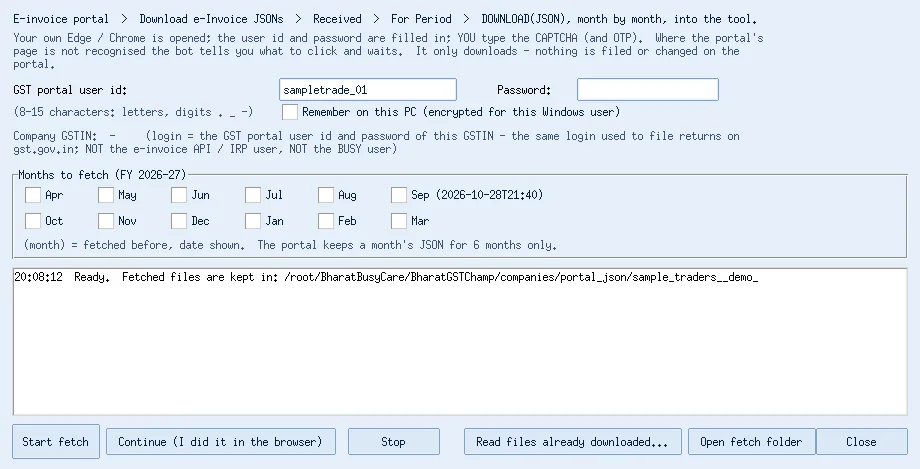
In BUSY open Add-Ons > Bharat GST Champ and press E-invoice Fetch. Your browser opens the e-invoice portal, you type the CAPTCHA, tick the month, and every e-invoice your suppliers issued to you comes in with full item detail. It only downloads; nothing is filed or changed.
Minute 2: load e-invoice + GSTR-2B
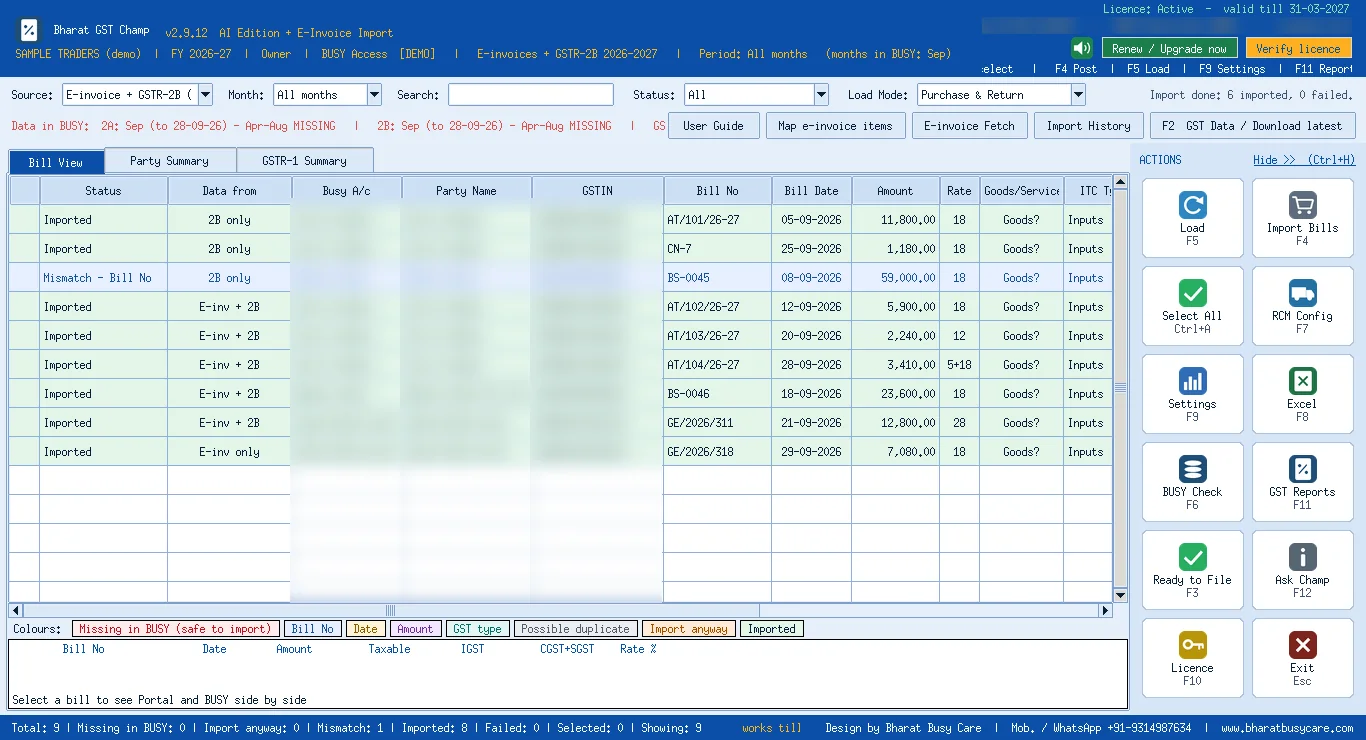
Choose E-invoice + GSTR-2B (combined) and press F5. E-invoice bills come with items, HSN, qty and rate; GSTR-2B adds the smaller suppliers' bills that have no e-invoice, so the whole month's purchases are on one screen. Bills not yet in BUSY show in red.
Minute 3: a quick look
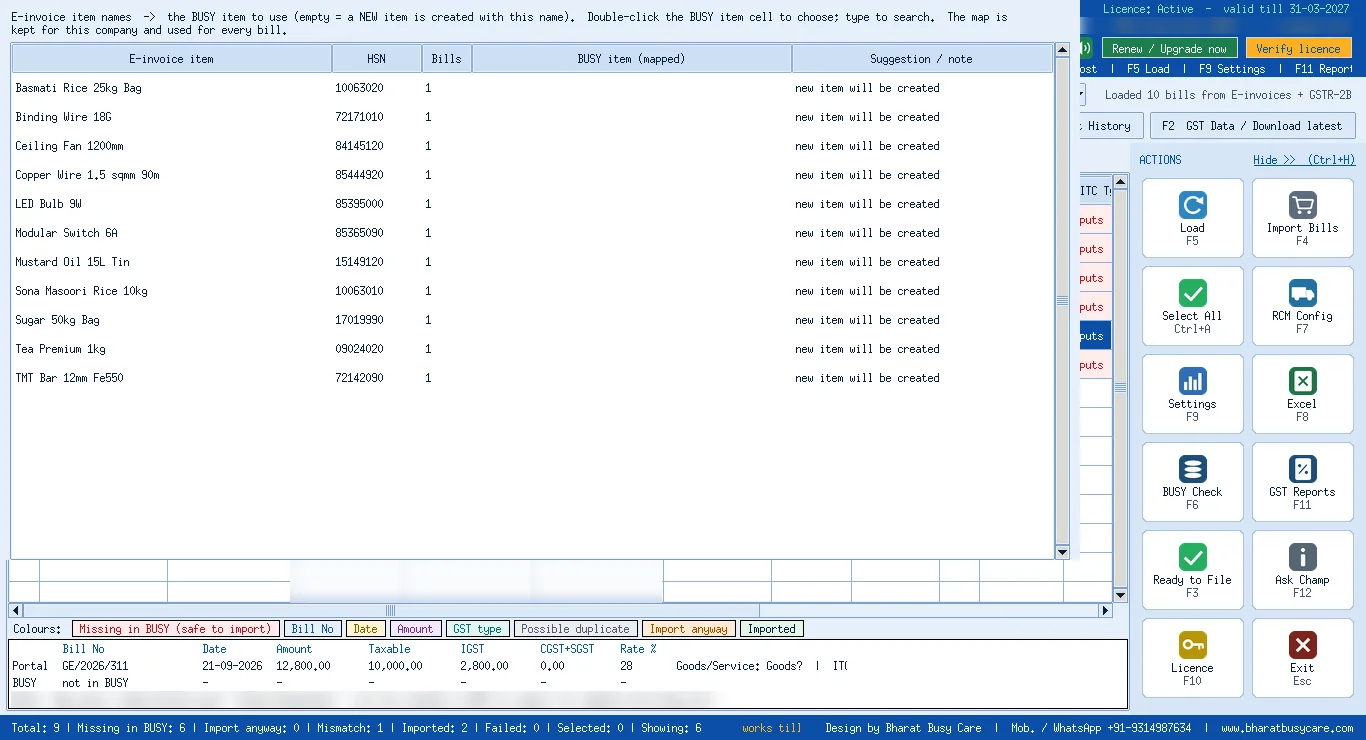
Open any bill to see the lines exactly as they will be posted. Items are matched to your BUSY items through the item map you saved once, so no look-alike items are created.
Minutes 4-5: pre-check and post
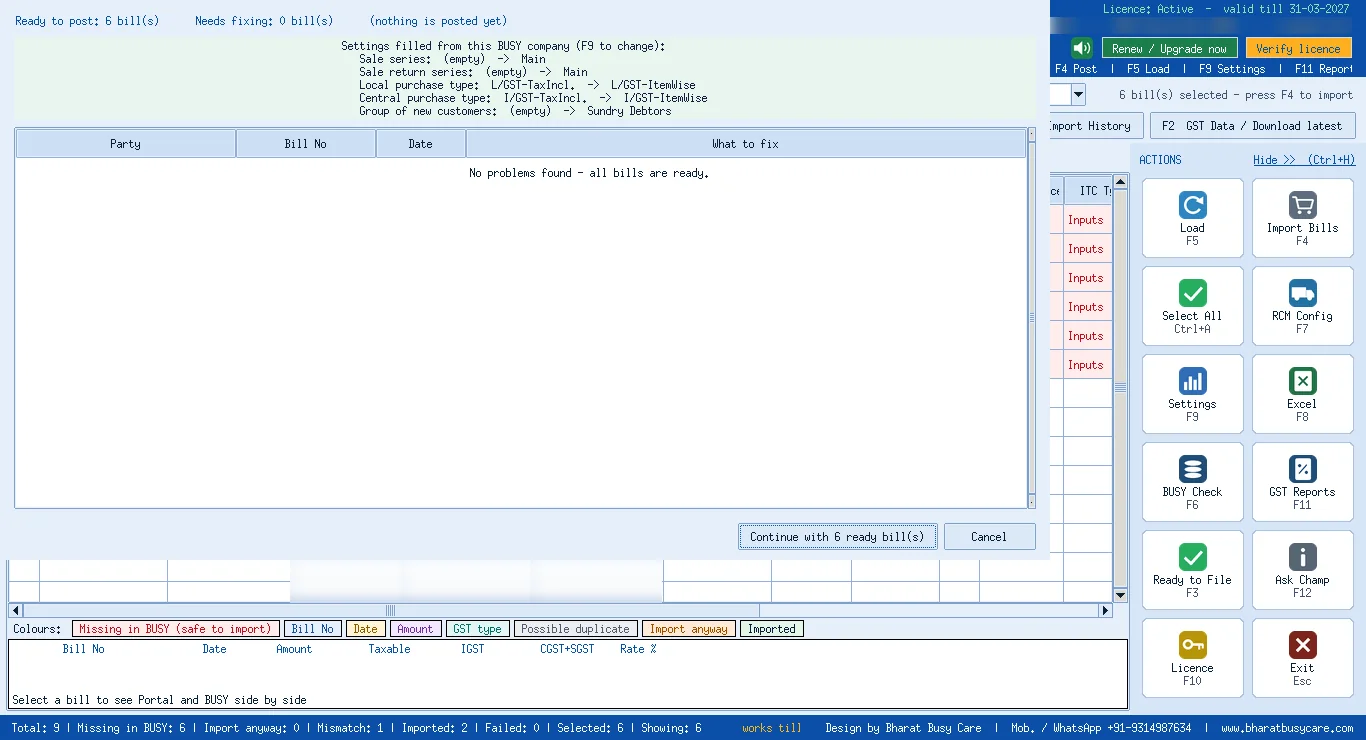
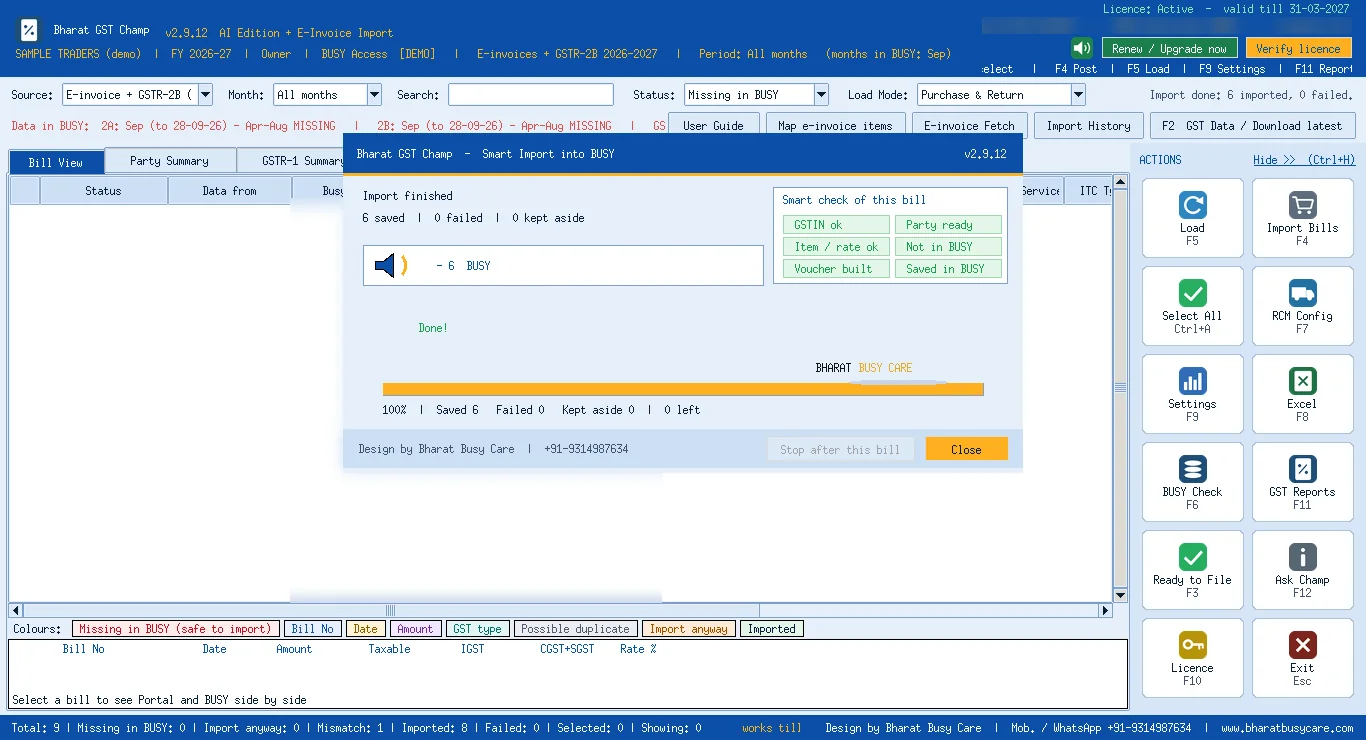
Ctrl+A selects only the bills that are safe to import, F4 runs a pre-check of series, voucher type and accounts, and after your Yes each bill is saved in BUSY as a purchase voucher, with the IRN in the narration. Bills already in BUSY are skipped, so nothing is entered twice.
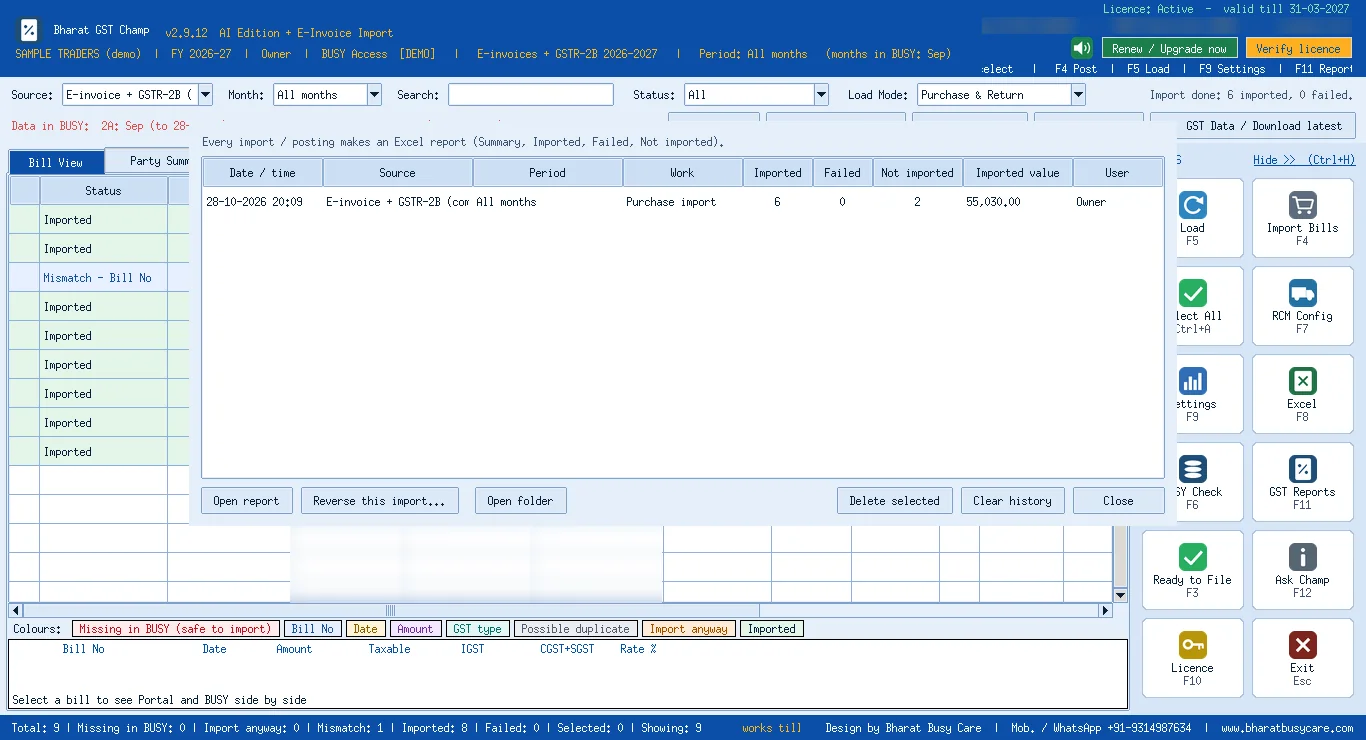
Done: proof kept
Every run goes into Import History with an Excel report, and a wrong run can be reversed.
What changes for the accountant
| Before | With Bharat GST Champ | |
|---|---|---|
| Month's purchase entry | Hours or days of typing | One sitting of minutes |
| Item, HSN, qty, rate | Typed line by line | Taken from the supplier's e-invoice |
| Purchase register vs GSTR-2B | Matched separately, mismatches chased later | Shown together on one screen |
| Missed or double bills | Found at return time, or by a notice | Red = not in BUSY; duplicates skipped |
| First week of the month | Overtime | Free for checking, clients and family |
Fair to know
- E-invoices come from suppliers above the e-invoice turnover limit (currently Rs 5 crore); most long bills are from them. Smaller suppliers' bills come from GSTR-2B and post rate-wise or with remembered items.
- The first month takes a little longer while you map the item names; after that the map is reused.
- Your accountant still checks and says Yes. The tool removes typing, not responsibility; take a BUSY backup before the first posting.
- Sales stay in BUSY as today; GST Champ also compares your BUSY sales with GSTR-1 so the sales side is checked too.
Plan the holiday
The month-end rush is mostly typing. Take the typing away and the first week of the month is for checking, filing and going home on time. Try it on your own data: Bharat GST Champ has a free demo (sign in with Google + OTP). Watch the 70-second video, or read how it handles long purchase bills.
Need it done for you?
Our team sets this up remotely over UltraViewer, usually the same day. Call or message us, or see BUSY services.
Disclaimer: This article is general information for business owners, accountants and tax professionals, written by Bharat Busy Care as understood on the date shown below. It is not legal, tax or professional advice. GST, income-tax and other laws, rates, forms, due dates and portal steps change often: check the current Acts, rules, notifications, circulars and official advisories, and consult your CA or tax practitioner before acting on it. BUSY menu names can differ by version, plan and configuration; take a backup before changing settings. Bharat Busy Care is not responsible for any loss arising from the use of this information. BUSY is a trademark of its owner; Bharat Busy Care is an Authorised BUSY Platinum Partner. See our terms.
अस्वीकरण: यह लेख केवल सामान्य जानकारी के लिए है, कानूनी या टैक्स सलाह नहीं है। नियम बदलते रहते हैं; कोई भी निर्णय लेने से पहले नवीनतम अधिसूचना देखें और अपने CA / टैक्स सलाहकार से सलाह लें।
Updated 2026-10-30 · Bharat Busy Care, Authorised BUSY Platinum Partner
FAQ
Can Bharat GST Champ really enter a month of purchase bills in 5 minutes?
For a typical month, once your items are mapped, the fetch, load, pre-check and posting take a few minutes. The time depends on the number of bills, portal speed and new items in the first month.
Which purchase bills does it post?
E-invoice bills with full item detail, and GSTR-2B bills of suppliers who do not issue e-invoices, posted rate-wise or with remembered items. Bills already in BUSY are skipped.
Does it make sales entries too?
No. Sales are made in BUSY while billing. Bharat GST Champ compares your BUSY sales with GSTR-1 so differences are found before filing.
Is anything posted without the accountant's approval?
No. Bills are posted only after the pre-check and your Yes, every run is kept in Import History, and a wrong run can be reversed.
Do I need the e-invoice portal login?
Yes, the login of your GSTIN on the GST e-invoice portal. You type the CAPTCHA yourself; the tool only downloads your received e-invoices.
Talk to a BUSY expert
Call or message us; we answer in Hindi or English.